[Index] [Catalog] [Bottom] R: 9 / P: 3 / Connecting

File: total vibegod victory.jpg (1.2MB, 2708x3464)
Post Image
I want it to automatically switch to a light or dark theme of my choice based on my system settings. For example, if I am using light mode in Windows, it should automatically switch to the light theme of my choice like SimpleChan or Gurochan.
>>191810 hi :D
>>191811 Do you have an active AI subscription? If so, please spare a few tokens for this.
File: 1790109954114503m.jpg (176.8KB, 819x1024)
Post Image
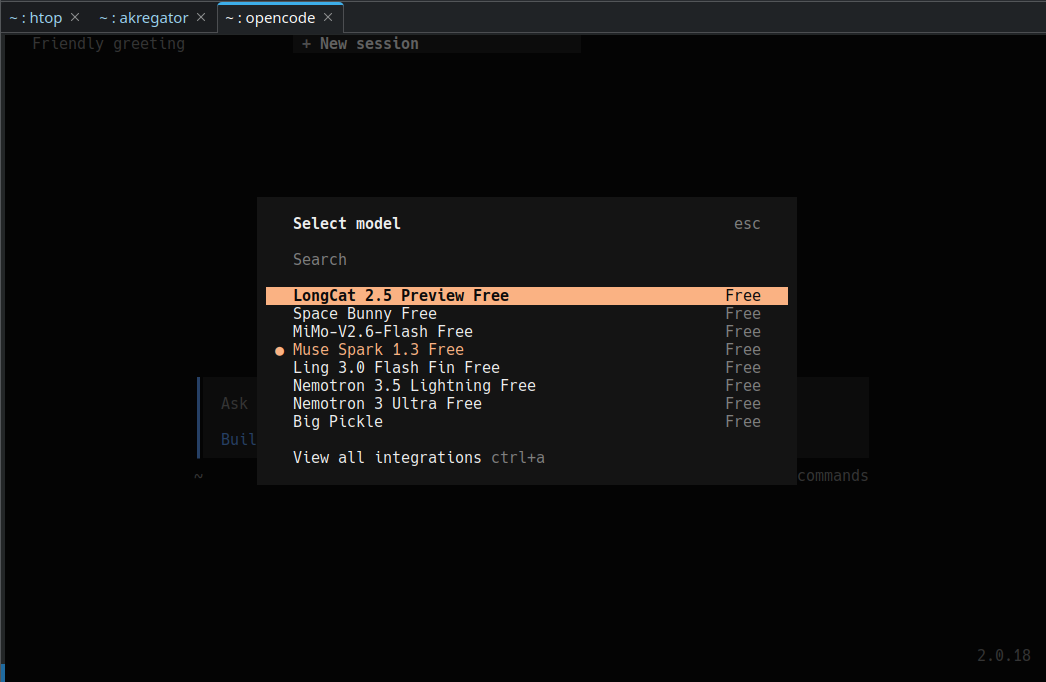
>>191813 :D >Do you have an active AI subscription? i don't but you can use opencode's free models it will be able to give you a js script which you can use with violentmonkey
File: Screenshot_20260927_150705.png (50.4KB, 1046x682)
Post Image
>>191818 pic rel.
>>191818 >>191820 Thanks anon.
>>191825 my pleasure :D
I made it work: // ==UserScript== // @name IndiaChan - Auto Dark/Light Theme // @namespace https://indiachan.top/https://indiachan.top/ // @version 1.0.0 // @description Automatically switches IndiaChan between your chosen light/dark themes based on the browser/Windows color-scheme setting. // @author You // @match https://indiachan.top/https://indiachan.top/* // @match https://www.indiachan.top/https://www.indiachan.top/* // @run-at document-start // @grant none // ==/UserScript== (() => { 'use strict'; // ========================= // YOUR PREFERRED THEMES // ========================= const LIGHT_THEME = 'Simplechan'; const DARK_THEME = 'Simplechan Dark'; const THEME_ALIASES = { 'Simplechan': ['Simplechan'], 'Simplechan Dark': ['Simplechan Dark', 'SimplechanDark'], 'Gurochan': ['Gurochan'], 'Tomorrow': ['Tomorrow'], 'Lainchan': ['Lainchan'] }; const mediaQuery = window.matchMedia('(prefers-color-scheme: dark)'); let lastMode = null; let applyTimer = null; const normalize = (value) => String(value ?? '') .trim() .toLowerCase() .replace(/\s+/g, ' '); function aliasesFor(themeName) { return [themeName, ...(THEME_ALIASES[themeName] || [])] .filter(Boolean) .map(normalize); } function matchesTheme(value, themeName) { const actual = normalize(value); return aliasesFor(themeName).some(alias => { if (!alias) return false; return ( actual === alias || actual.replace(/[ _-]/g, '') === alias.replace(/[ _-]/g, '') ); }); } function getWantedTheme() { return mediaQuery.matches ? DARK_THEME : LIGHT_THEME; } function findThemeSelect(themeName) { const selects = document.querySelectorAll('select'); for (const select of selects) { const options = [...select.options]; const option = options.find(opt => matchesTheme(opt.textContent, themeName) || matchesTheme(opt.value, themeName) ); if (option) { return { select, option }; } } return null; } function findThemeRadio(themeName) { const radios = document.querySelectorAll( 'input[type="radio"]' ); for (const radio of radios) { const label = radio.id ? document.querySelector( `label[for="${CSS.escape(radio.id)}"]` ) : radio.closest('label'); const text = label?.textContent || radio.value || radio.getAttribute('data-theme') || ''; if ( matchesTheme(text, themeName) || matchesTheme(radio.value, themeName) ) { return radio; } } return null; } function findThemeClickable(themeName) { const explicit = document.querySelectorAll( '[data-theme], [data-skin], [data-style], ' + '[data-theme-name], [data-skin-name]' ); for (const element of explicit) { const values = [ element.getAttribute('data-theme'), element.getAttribute('data-skin'), element.getAttribute('data-style'), element.getAttribute('data-theme-name'), element.getAttribute('data-skin-name'), element.textContent ]; if ( values.some(value => matchesTheme(value, themeName) ) ) { return element; } } const controls = document.querySelectorAll( 'button, a, [role="button"], label' ); for (const element of controls) { const text = normalize(element.textContent); if ( aliasesFor(themeName).some( alias => text === alias ) ) { return element; } } return null; } function currentThemeLooksRight(themeName) { // Select elements for (const select of document.querySelectorAll('select')) { const selected = select.options[select.selectedIndex]; if (!selected) continue; if ( matchesTheme(selected.textContent, themeName) || matchesTheme(selected.value, themeName) ) { return true; } } // Checked radio buttons for ( const radio of document.querySelectorAll( 'input[type="radio"]:checked' ) ) { if (matchesTheme(radio.value, themeName)) { return true; } const label = radio.id ? document.querySelector( `label[for="${CSS.escape(radio.id)}"]` ) : radio.closest('label'); if ( label && matchesTheme(label.textContent, themeName) ) { return true; } } // Theme attributes on page const candidates = [ document.documentElement, document.body ].filter(Boolean); for (const element of candidates) { const attrs = [ element.getAttribute('data-theme'), element.getAttribute('data-skin'), element.getAttribute('data-style') ]; if ( attrs.some(value => matchesTheme(value, themeName) ) ) { return true; } } return false; } function setSelect(select, option) { if (select.value === option.value) { select.dispatchEvent( new Event('change', { bubbles: true }) ); return true; } select.value = option.value; select.dispatchEvent( new Event('input', { bubbles: true }) ); select.dispatchEvent( new Event('change', { bubbles: true }) ); return true; } function setRadio(radio) { if (!radio.checked) { radio.checked = true; } radio.dispatchEvent( new Event('input', { bubbles: true }) ); radio.dispatchEvent( new Event('change', { bubbles: true }) ); return true; } function applyTheme(force = false) { const mode = mediaQuery.matches ? 'dark' : 'light'; const wantedTheme = getWantedTheme(); if ( !force && mode === lastMode && currentThemeLooksRight(wantedTheme) ) { return; } const selectMatch = findThemeSelect(wantedTheme); if (selectMatch) { setSelect( selectMatch.select, selectMatch.option ); lastMode = mode; return; } const radio = findThemeRadio(wantedTheme); if (radio) { setRadio(radio); lastMode = mode; return; } const clickable = findThemeClickable(wantedTheme); if (clickable) { clickable.click(); lastMode = mode; return; } } function scheduleApply(force = false) { clearTimeout(applyTimer); applyTimer = setTimeout( () => applyTheme(force), 100 ); } // Initial application if (document.readyState === 'loading') { document.addEventListener( 'DOMContentLoaded', () => scheduleApply(true), { once: true } ); } else { scheduleApply(true); } // React to Windows/browser light ↔ dark changes const onSchemeChange = () => { lastMode = null; scheduleApply(true); }; if ( typeof mediaQuery.addEventListener === 'function' ) { mediaQuery.addEventListener( 'change', onSchemeChange ); } else if ( typeof mediaQuery.addListener === 'function' ) { mediaQuery.addListener(onSchemeChange); } // Handle dynamically generated theme controls const observer = new MutationObserver(() => { scheduleApply(false); }); const startObserver = () => { if (!document.documentElement) return; observer.observe( document.documentElement, { childList: true, subtree: true } ); scheduleApply(true); }; if (document.readyState === 'loading') { document.addEventListener( 'DOMContentLoaded', startObserver, { once: true } ); } else { startObserver(); } })();
>>191848 Just used ChatGPT Free version kek.
Imagine if we also vibecode threadwatcher and other such features found in scripts like 4chanX.

[Post Reply]
[Index] [Catalog] [Top] R: 9 / P: 3 / Connecting

Theme: